

Substack introduced something last week that the great majority of people will use once, for one thing, and then ignore.
The new feature called audience-specific content and works like this: you insert a block mid-post, select who can see it (non-subscribers, free subscribers, paid subscribers, founding subscribers or any combinations), type whatever you want to be in it, and publish.
Everyone who reads it will see only the block that applies to their situation and will be completely unaware of the block for anyone else.
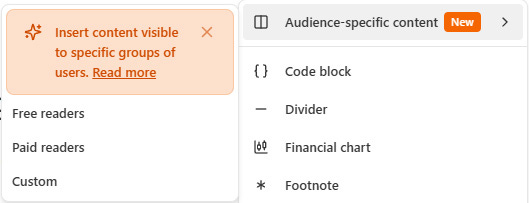
You can use it to replace the subscribe button and show non-subscribers an offer, show paid subscribers a thank-you and move on. That works well too. :)
However there is about a dozen other tricks that you can do with it, and most of them are more interesting than a CTA swap.
Here’s a look at some creative uses, divided up by what they actually do.
1. Stop sending everyone to the same place
Most posts end for everyone with the same format: one closing paragraph, one subscribe button.
Makes sense, until you stop and realize when a subscriber hits that button, it doesn’t make sense for them. Audience-specific content solves this.
You write one closing section, and Substack will display a different version to every audience type you set.
Take my previous post as an example. This was my original ending:
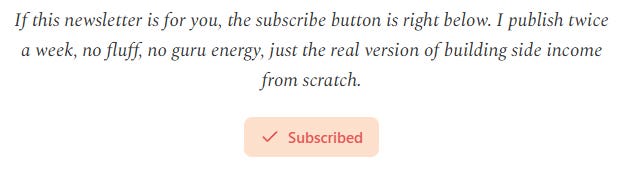
Perfect for a non subscriber - nonsensical for someone already subscribed to you.
Audience-specific blocks make that one closing section four!
The non-subscribers will still see the same paragraph and the Subscribe button – exactly like before. (It literally changes nothing – a good starting point if you’re just starting with blocks!)
For free subscribers you can share a gentle nudge about what awaits behind the paid tier (you can make this with the same Subscribe button from the editor, it becomes “Upgrade to paid” in the frontend).
For paying subscribers you can link a post to read next, or a link to your product.
Your Founding subscribers can get what paying subscribers are seeing, or you can put something entirely different in this section, for example if you offer coaching for your Founding members then you can offer it here.
So the same post ending will look something like this:
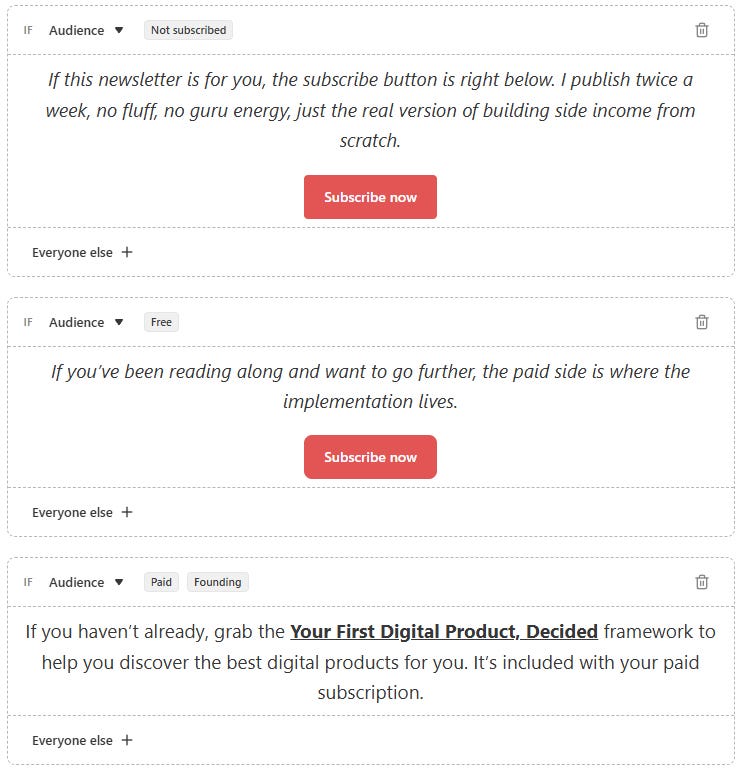
Substack makes your job easier with the possibility of combinations, as you can see in the last block above where I set that block for paid and Founding members.
So one block, two audience sets.
I think this feature is great for all of your old posts too. You can edit them and all of these sections will make more sense to your audience, segmented by their status.
2. One post, two versions of the same thing
The paywall cut is the default way to separate free and paid content. Free readers get the framework for example, paid readers get the implementation, there’s a visible line between them. It works, but it’s a blunt instrument.
There’s a way audience-specific blocks let’s you do something cool: offer two different versions of the same part of a post, so there’s really no cut over.
a. Obvious use is an exercise
Imagine writing a guide on doing a self-diagnosis.
Free gets 3 questions.
Paid gets 3 questions plus 4 more with an AI prompt tacked on at the end that then organizes all of their answers into a tiered ordered shortlist. It’s the same exercise just a bit deeper. They won’t ever even know there’s a two tier version.
b. You can do the same thing with case studies
Your free version of the section might be “I used this tactic, and this is how I failed.”
Your paid version of the section provides a full breakdown of what specifically, and what you would’ve done differently, and what you used to troubleshoot it. A single story with two depths of experience.
This is also where you can use the “and” combination logic of the feature. If you want non-paying subs, then you choose non-subscribed and free subscribers in a single block. Only paying members, for instance, gets the deep-dive.
The functional benefit over a paywall cut is obvious: everyone gets a complete post.
Free readers don’t encounter a mid-paragraph wall, they receive a complete narrative. Paid members get the whole story.
Though it is great sometimes to indicate that there is more for paid subs, and “nudge” free ones to upgrade ;)
3. Are you selling something? Use this block!
Chances are you’re going to want to send an entirely new email, perhaps a series of emails to announce product launches. And sometimes you want to offer this product only for a selected subscriber group without broadcasting to everyone.
Now you can do this with the audience-specific blocks in your posts without writing a different email.
a. Early Bird Offers
For example: your post goes out. Paid subs will see a CTA with your new product link and a discount code. Free subscribers and non-subscribers see nothing there. The post contains the offer, but only for those who you want to offer it first.
(Tip: use the block’s “Everyone else” part to display that people have 48 hours to upgrade if they want your product at the early-bird price, if your product is not just for the paid audience ;)
After 48 hours you can go back and edit your post and change the block’s content to the full price and make it available for everyone. This way you don’t need to write two posts, you can just swap the details without sending different emails.
b. Beta Testing
If you want ten people to try something before it goes public, you don’t need a separate email or a waitlist form. You put a block inside a regular post, visible only to paid subscribers, that says: “I’m testing something and I need a few people to try it out first. Drop a reply to this if you’re interested!”
The responses will come from your most engaged readers, who are already invested enough to pay.
c. Offer Your Done-For-You Services at the Right Moment
If you offer coaching, done-for-you help or other personal involvement for your paid subscribers, then you can insert a block for them in your posts at the right moment.
For example: “If you need help to implement the technique I’ve just written about, then get in touch. I have 2 spots available for personal coaching.”. This block is a great place to start conversations with the right people at the right time.
The next two groups are where it gets more interesting: how to handle readers who found you by accident, and what to show the people who’ve been with you the longest.
